

Lesson 20: Project - The E-Commerce Buyer

The Junior Trap: Why Your First Attempt Will Fail in Production
Picture this: You’re a fresh QA engineer, and your manager asks you to automate an e-commerce checkout flow. You fire up Selenium, and write something like this:
driver.get("https://example-shop.com")
time.sleep(5)  # "Wait for page to load"
search_box = driver.find_element(By.ID, "search")
search_box.send_keys("laptop")
time.sleep(3)  # "Wait for search results"
driver.find_element(By.CLASS_NAME, "product-card").click()
time.sleep(5)  # "Wait for product page"
driver.find_element(By.ID, "add-to-cart").click()
# ... and so on
You run it on your laptop. It works! You commit it. Your manager is impressed.
Then the CI/CD pipeline runs it on a cloud server in another region. It fails 40% of the time.
Why This Code is a Production Disaster
Let me explain this in simple terms. When you use
time.sleep(5), you’re telling the program: “Do nothing for 5 seconds.” But here’s the problem:
Network Speed Varies: Your laptop on office Wi-Fi loads the page in 1 second. The CI server in Tokyo might take 7 seconds. Your sleep doesn’t care—it waits exactly 5 seconds, then continues. If the page isn’t loaded, your test tries to click on an element that doesn’t exist yet. Boom. Test fails.
Wasted Time: On a good day, the page loads in 0.8 seconds, but you still wait 5 seconds. That’s 4.2 seconds of the CPU doing absolutely nothing. Multiply this across 200 tests, and you’ve just added 14 minutes of pure waste to your build pipeline. Your team waits 14 extra minutes to deploy because you didn’t know better.
Race Conditions: The element appears on screen, but there’s a loading spinner overlay on top of it. Your sleep finishes, you try to click, and Selenium throws
ElementNotInteractableExceptionbecause the button is technically there, but not clickable.False Sense of Security: The worst part? Sometimes it works. This randomness makes you think the test is “a bit flaky,” so you add more sleeps, making it worse. I’ve seen codebases with
time.sleep(10)everywhere. It’s a death spiral.
The Failure Mode: Stale Elements and Phantom Clicks
When you run web automation in a real environment, you encounter two major enemies:
1. StaleElementReferenceException
This happens when:
You find an element:
product = driver.find_element(By.CLASS_NAME, "product")The page updates (JavaScript re-renders a component)
You try to interact with your variable:
product.click()Error: The element you’re holding is now “stale”—it’s a reference to something that no longer exists in the current DOM
2. The Phantom Click
Your script finds the “Add to Cart” button and clicks it. Nothing happens. Why? Because:
The button exists in the DOM (so Selenium finds it)
But there’s an invisible modal overlay covering it
Or a CSS animation is still playing
Or the JavaScript event listener hasn’t been attached yet
Your naive
find_element().click()doesn’t check any of this. It just... fails silently or throws cryptic errors.
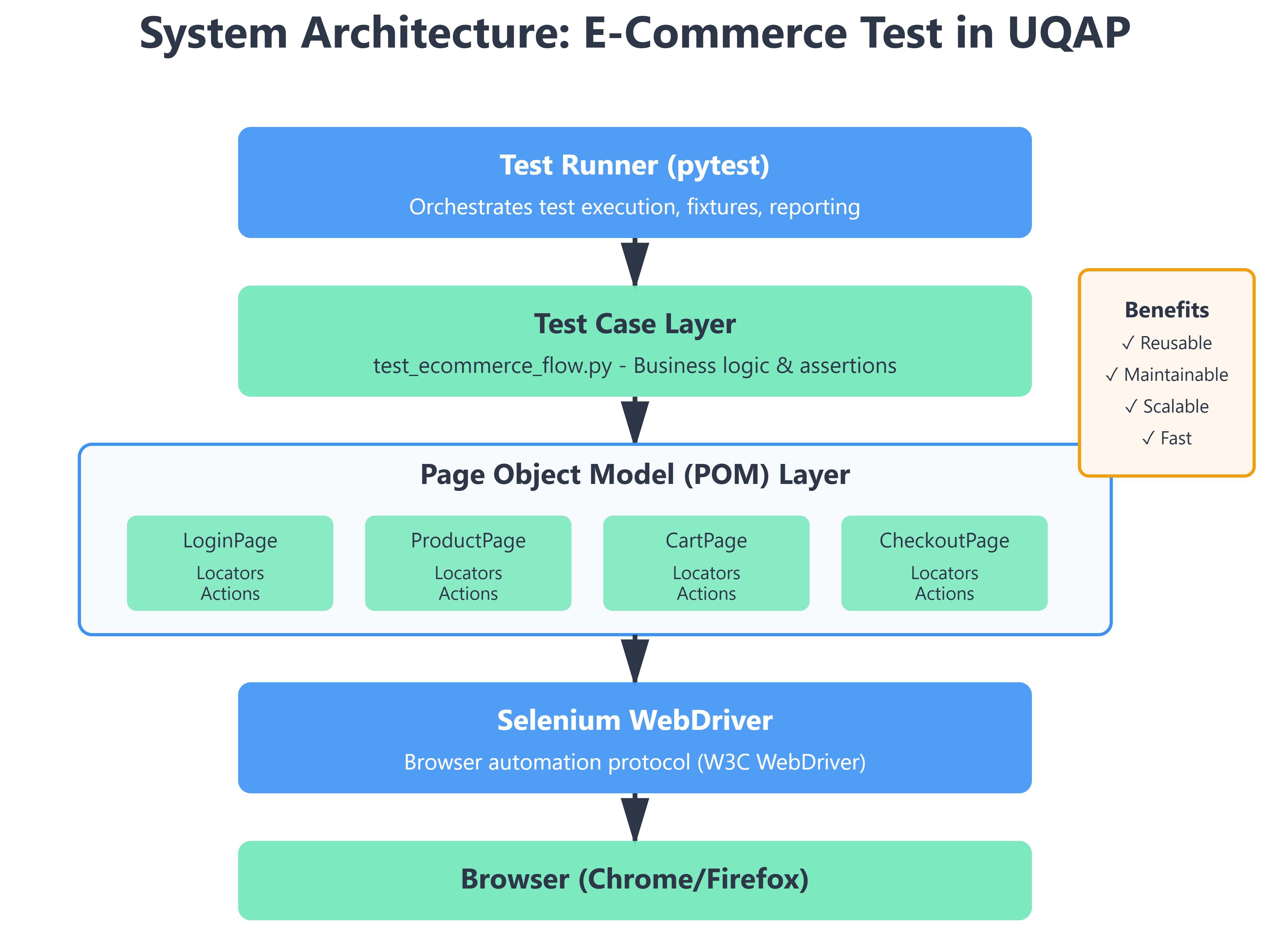
The UQAP Solution: Explicit Waits + Page Object Model
Here’s how professional SDETs solve this. We use two core engineering patterns:
1. Explicit Waits - The Intelligent Polling Mechanism
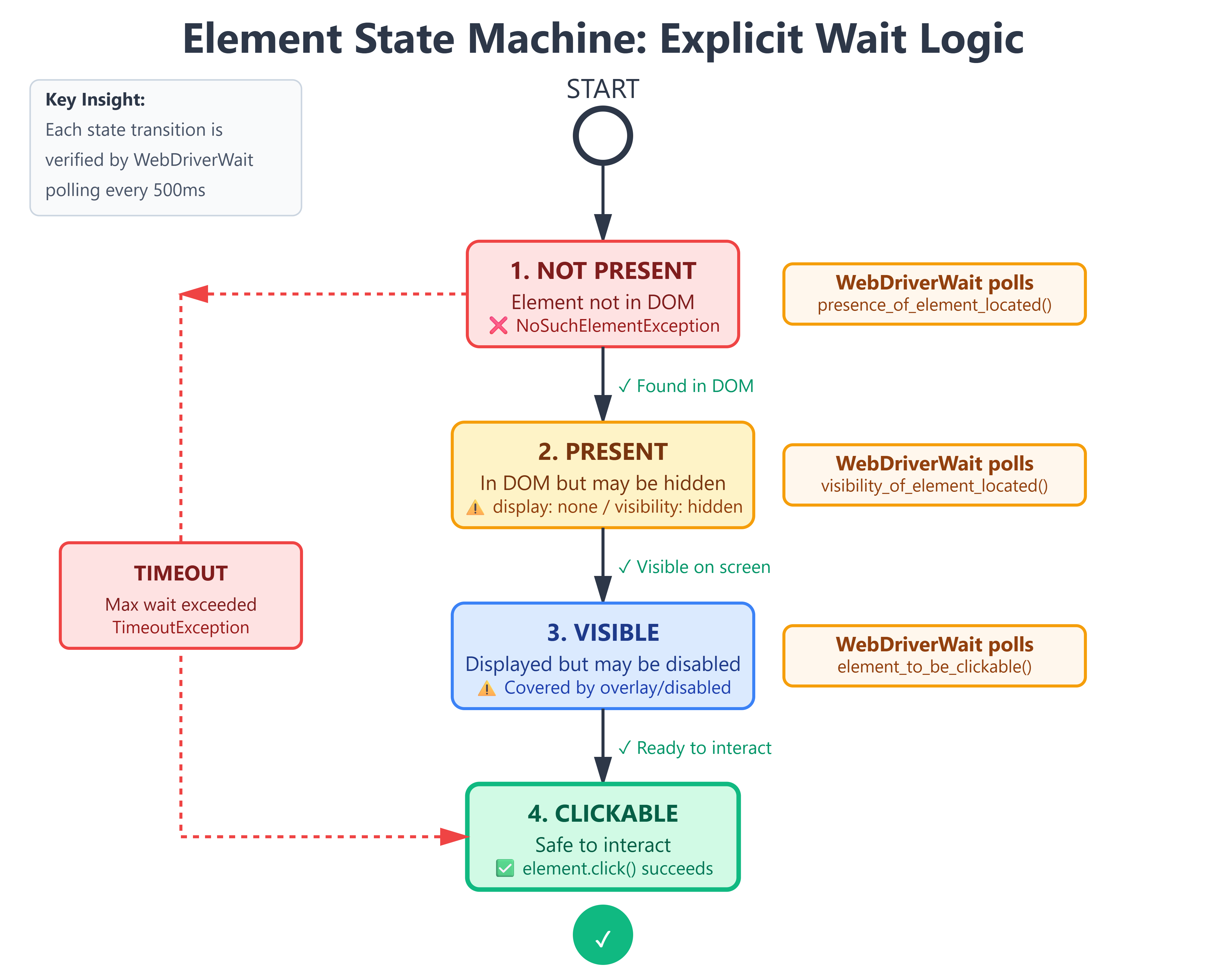
Instead of sleeping for a fixed duration, we tell Selenium: “Wait UP TO 10 seconds, checking every 500ms, until this specific condition is true.”
from selenium.webdriver.support.ui import WebDriverWait
from selenium.webdriver.support import expected_conditions as EC

wait = WebDriverWait(driver, 10)
element = wait.until(EC.element_to_be_clickable((By.ID, "add-to-cart")))
element.click()
What’s happening here?
WebDriverWait(driver, 10): “I’ll wait up to 10 seconds”until(...): “Keep checking until this condition returns True”EC.element_to_be_clickable(...): This is the smart part. It checks:Is the element in the DOM? ✓
Is it visible? ✓
Is it enabled (not disabled)? ✓
Is it not obscured by another element? ✓
If all these are true at 1.2 seconds, it returns immediately. If they’re not true by 10 seconds, it raises TimeoutException.
The result? Your test runs as fast as possible, but never faster than the application can handle.
2. Page Object Model - Encapsulation of Chaos
Here’s the brutal truth: Web UIs change constantly. A developer decides to rename id="search" to id="searchInput". If you have 50 tests that reference this ID, you now have to update 50 files.
The Page Object Model says: “Put all the UI interaction logic for one page in one class.”
class ProductSearchPage:
    def __init__(self, driver):
        self.driver = driver
        self.wait = WebDriverWait(driver, 10)
        # Locators - centralized
        self.SEARCH_BOX = (By.ID, "search")
        self.SEARCH_BUTTON = (By.CSS_SELECTOR, "button[type='submit']")

    def search_product(self, query: str):
        search_box = self.wait.until(EC.presence_of_element_located(self.SEARCH_BOX))
        search_box.clear()
        search_box.send_keys(query)

        search_btn = self.wait.until(EC.element_to_be_clickable(self.SEARCH_BUTTON))
        search_btn.click()
Now, when the UI changes, you update ONE file. All 50 tests continue to work.
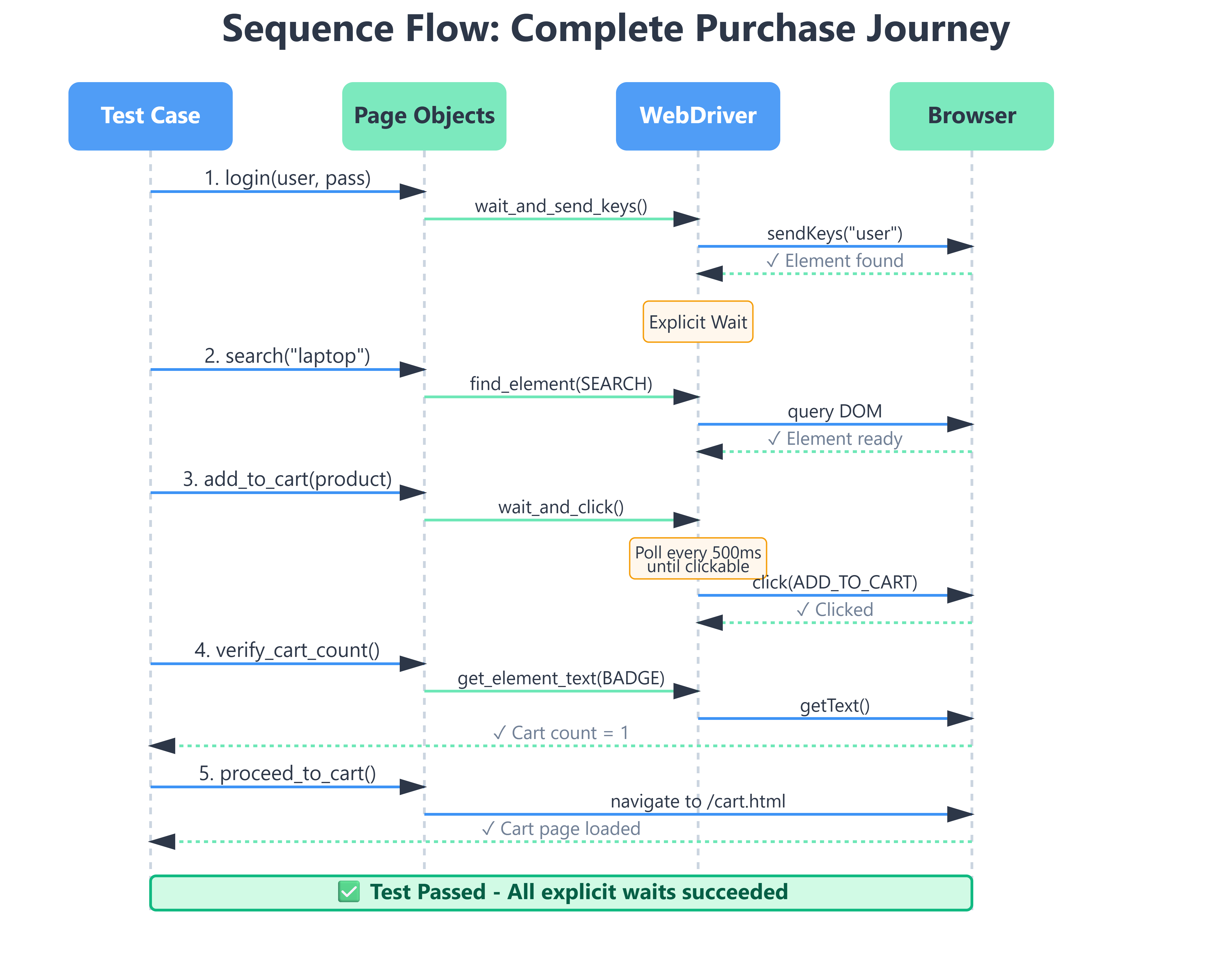
Implementation Deep Dive: The Mechanics
GitHub Link :
https://github.com/sysdr/autotestman/tree/main/lesson20/lesson_20_ecommerce_buyer
Let’s break down the critical parts:
The BasePage Pattern
Every page inherits from a BasePage that provides reusable wait utilities:
class BasePage:
    def __init__(self, driver):
        self.driver = driver
        self.wait = WebDriverWait(driver, 10)

    def wait_and_click(self, locator: tuple):
        """Wait for element to be clickable, then click it"""
        element = self.wait.until(EC.element_to_be_clickable(locator))
        element.click()
        return element

    def wait_and_send_keys(self, locator: tuple, text: str):
        """Wait for element to be present, clear it, and send keys"""
        element = self.wait.until(EC.presence_of_element_located(locator))
        element.clear()
        element.send_keys(text)
        return element
Why this matters:
__init__sets up the driver and wait object once per pageEach method has a single responsibility
Returning
elementallows method chaining if neededType hints (
locator: tuple,text: str) make the code self-documenting
Custom Expected Conditions
Sometimes the built-in conditions aren’t enough. You need to wait for “the cart badge shows ‘1’”. You create custom conditions:
class cart_count_updated:
    def __init__(self, locator, expected_count):
        self.locator = locator
        self.expected_count = expected_count

    def __call__(self, driver):
        try:
            element = driver.find_element(*self.locator)
            return element.text == str(self.expected_count)
        except:
            return False

# Usage
wait.until(cart_count_updated((By.ID, "cart-badge"), 1))
This is a callable class (has __call__ method). WebDriverWait will keep calling it until it returns True.
Production Readiness: The Metrics That Matter
How do you know your test is production-grade? Here are the benchmarks:
1. Test Stability > 99%
Run your test 100 times in different environments (local, CI, different browsers). It should pass at least 99 times. If you’re seeing 10% failure rate, you have timing issues that need explicit waits.
2. Execution Time < 15 seconds
For a flow that searches, views a product, and adds to cart, this should complete in under 15 seconds on average hardware. If it’s taking 45 seconds, you’re over-waiting somewhere.
3. Zero Hard Sleeps
Search your codebase for time.sleep(). Delete them all (except for intentional rate limiting). Replace with explicit waits.
How to Verify Success:
# Run the test
python setup_lesson.py

# You should see:
# ✓ Search completed in 1.2s
# ✓ Product page loaded in 0.8s
# ✓ Cart updated in 0.5s
# Total execution: 8.3s
Step-by-Step Guide
Prerequisites
pip install selenium webdriver-manager pytest
Execution
# Generate the workspace
python setup_lesson.py

# Run the test
cd lesson_20_ecommerce_buyer
pytest tests/test_ecommerce_flow.py -v
Working Demo Link :
Verification
The test will:
Open a demo e-commerce site (we’ll use a sandbox environment)
Search for “laptop”
Click on the first product
Verify product details loaded
Add to cart
Verify cart count updated to 1
Proceed to cart page
Success looks like:
tests/test_ecommerce_flow.py::test_complete_purchase_flow PASSED [100%]
Execution time: 12.4s
The Bottom Line
The difference between a junior and senior SDET isn’t just knowing Selenium commands. It’s understanding:
Why explicit waits are non-negotiable (they match reality: things take variable time)
How the Page Object Model scales (change UI in one place, not 50)
When to create custom conditions (when built-ins don’t match your domain)
When you ship this to production, it won’t fail randomly. It won’t waste 30 minutes per build. It will be boring and reliable—the highest compliment for test automation.
Now go build it. The setup_lesson.py script will give you the full workspace. Run it, break it, understand it, and make it yours.