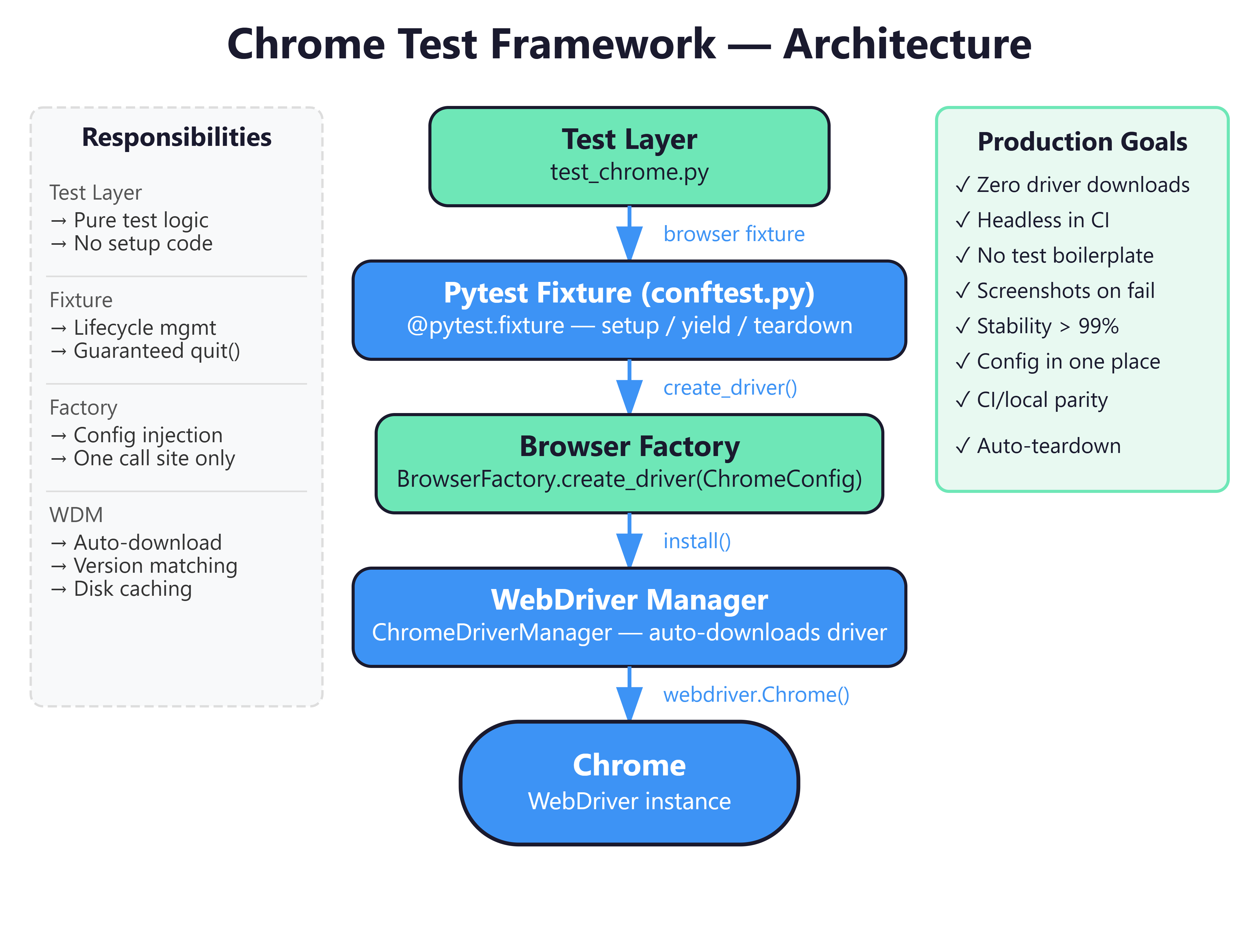
Lesson 27: Cross-Browser Testing — Building a Scalable Chrome Test Framework

The Junior Trap: Hard-Coded Chrome Everywhere
Picture this: You’ve joined a team that only uses Chrome — as many enterprise environments do. Your manager says, “Write tests for our app.” A junior developer writes this:
# test_login.py — The wrong way
def test_login():
    driver = webdriver.Chrome()   # Hard-coded, no configuration
    driver.get("https://myapp.com/login")
    driver.find_element(By.ID, "username").send_keys("admin")
    driver.find_element(By.ID, "password").send_keys("password123")
    driver.find_element(By.ID, "login-btn").click()
    assert "Dashboard" in driver.title
    driver.quit()

def test_signup():
    driver = webdriver.Chrome()   # Duplicated again
    # ... same setup repeated in every single test
This works. Until it doesn’t. Let me explain exactly why this destroys you in a real CI/CD environment.
The Failure Mode: Three Ways This Collapses
Failure 1: Driver Version Mismatch at 2 AM
Chrome auto-updates silently. Your CI pipeline doesn’t. One morning your entire build fails:
selenium.common.exceptions.SessionNotCreatedException:
Message: session not created: This version of ChromeDriver only
supports Chrome version 118. Current browser version is 119.
Every developer now manually hunts for the correct
chromedriverbinary. This is not engineering — it’s archaeological fieldwork.
Failure 2: No Configuration Control
Your QA manager asks: “Can we run tests headless on CI, but headed mode locally?” With
webdriver.Chrome()hard-coded in 50 test files, you’re rewriting half the codebase. A properly architected framework changes one environment variable.
Failure 3: Setup Code Drowning Your Tests
When
webdriver.Chrome()anddriver.quit()appear in every test function, you have 40% boilerplate and 60% actual test logic. The signal-to-noise ratio is terrible. Code reviewers can’t even tell what you’re actually testing.