

Lesson 28: Parallel Execution - Escaping the Sequential Bottleneck

The Junior Trap: The Sequential Time Sink
Picture this: You’re a QA engineer who just automated 200 test cases. You’re proud—until you run them. One after another, they execute sequentially. Each test takes 4 seconds on average. That’s 13 minutes and 20 seconds of waiting. Every. Single. Time.
Your CI/CD pipeline triggers on every pull request. Ten developers push code daily. That’s 133 minutes of compute time, just for your test suite. Now multiply that by the actual number of test suites in your organization.
Here’s what a junior developer writes:
# tests/test_suite.py
def test_user_login():
    browser.get("https://app.com/login")
    # ... 4 seconds of execution

def test_product_search():
    browser.get("https://app.com/products")
    # ... 4 seconds of execution

def test_checkout_flow():
    browser.get("https://app.com/checkout")
    # ... 4 seconds of execution
Running
pytest tests/executes these one by one. You have 8 CPU cores. Seven sit idle while one core grinds through your tests.
Why is this devastating in production?
Feedback Loop Delay: Developers commit broken code, go to lunch, come back to a failed build. They’ve already started new work.
Resource Waste: Your CI runner costs $0.05/minute. You’re paying for 7 idle cores.
Deployment Blocking: Can’t ship to production until tests pass. Sequential tests = longer time-to-market.
Scale Impossibility: 200 tests → 13 minutes. 2000 tests → 2 hours. 20,000 tests? See you tomorrow.
The Failure Mode: The CI/CD Traffic Jam
Let’s put real numbers to this. Imagine your company has:
50 microservices
500 automated tests per service (conservative)
3 seconds average per test
100 commits per day across teams
Sequential Math:
500 tests × 3 seconds = 1,500 seconds (25 minutes) per test run
100 commits × 25 minutes = 2,500 minutes = 41.6 hours of CI time daily
You need enough CI runners to handle peak load. Let’s say you need 10 parallel runners to keep wait times reasonable. That’s $720/day in compute costs (at $0.05/minute × 10 runners × 24 hours).
The Bottleneck Chain Reaction:
Test suite takes 25 minutes
Developers can’t get feedback quickly
They context-switch to other work
When tests fail, they’ve forgotten the code
Debugging takes longer
More commits to fix issues
More tests triggered
The cycle compounds
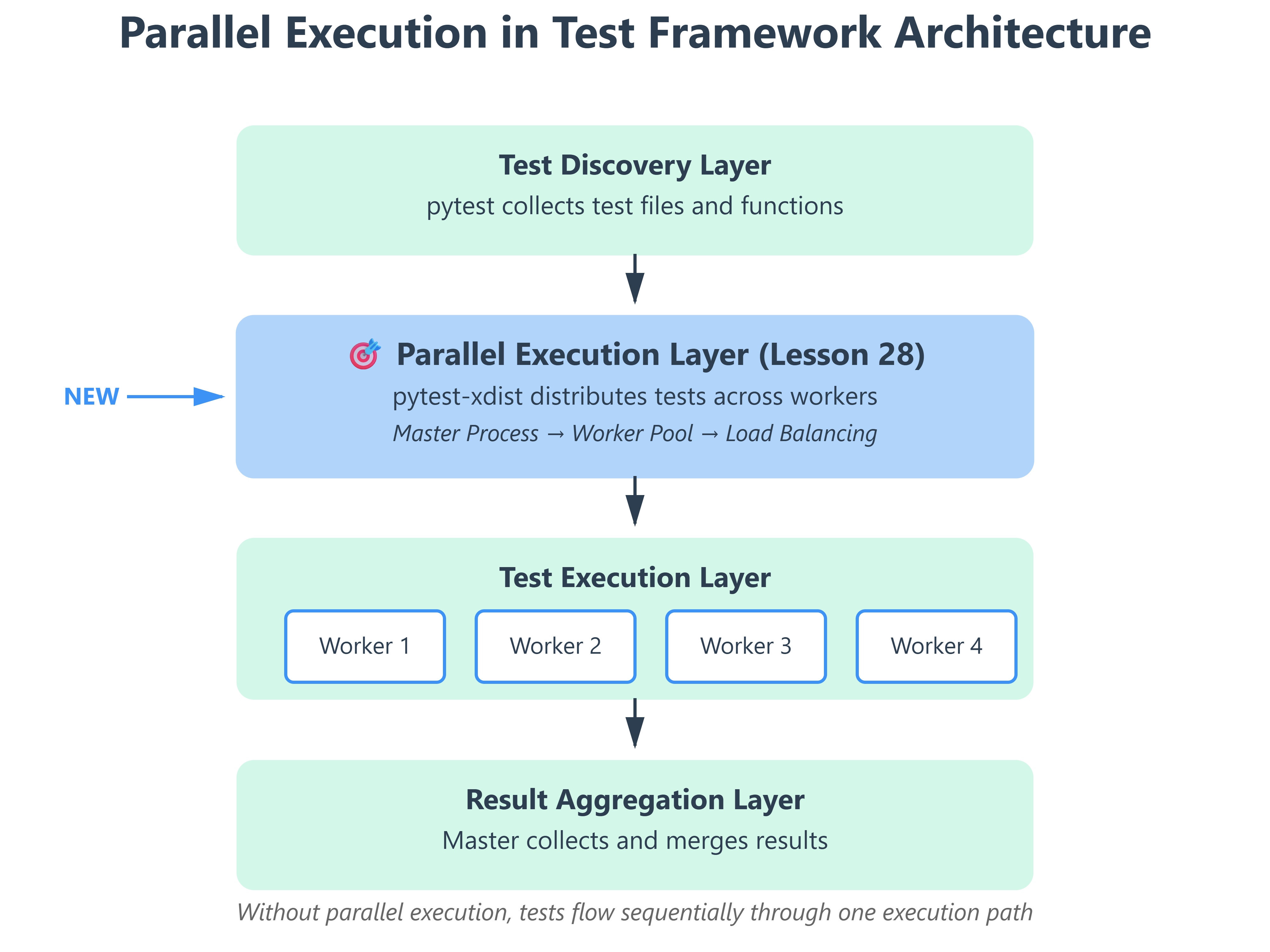
The UQAP Solution: Distributed Test Execution with pytest-xdist
The solution isn’t to write faster tests (though that helps). The solution is parallelism—running multiple tests simultaneously across multiple CPU cores or machines.
The Core Insight: Your tests are embarrassingly parallel. test_user_login() doesn’t need the result of test_product_search(). They’re independent operations. So why execute them sequentially?
Enter pytest-xdist: A pytest plugin that spawns multiple worker processes, each running a subset of your tests in isolation. If you have 4 CPU cores, you can run 4 tests simultaneously—cutting execution time by ~75%.
The Math Changes:
500 tests on 4 cores: 1,500 seconds ÷ 4 = 375 seconds (6.25 minutes)
100 commits × 6.25 minutes = 625 minutes = 10.4 hours of CI time daily
That’s a $480/day savings (down from $720 to $240)
Over a year? $175,200 saved. From one plugin.
Implementation Deep Dive: How pytest-xdist Works
GitHub Link:
https://github.com/sysdr/autotestman/tree/main/lesson28/lesson_28_parallel_executionArchitecture: Master-Worker Model
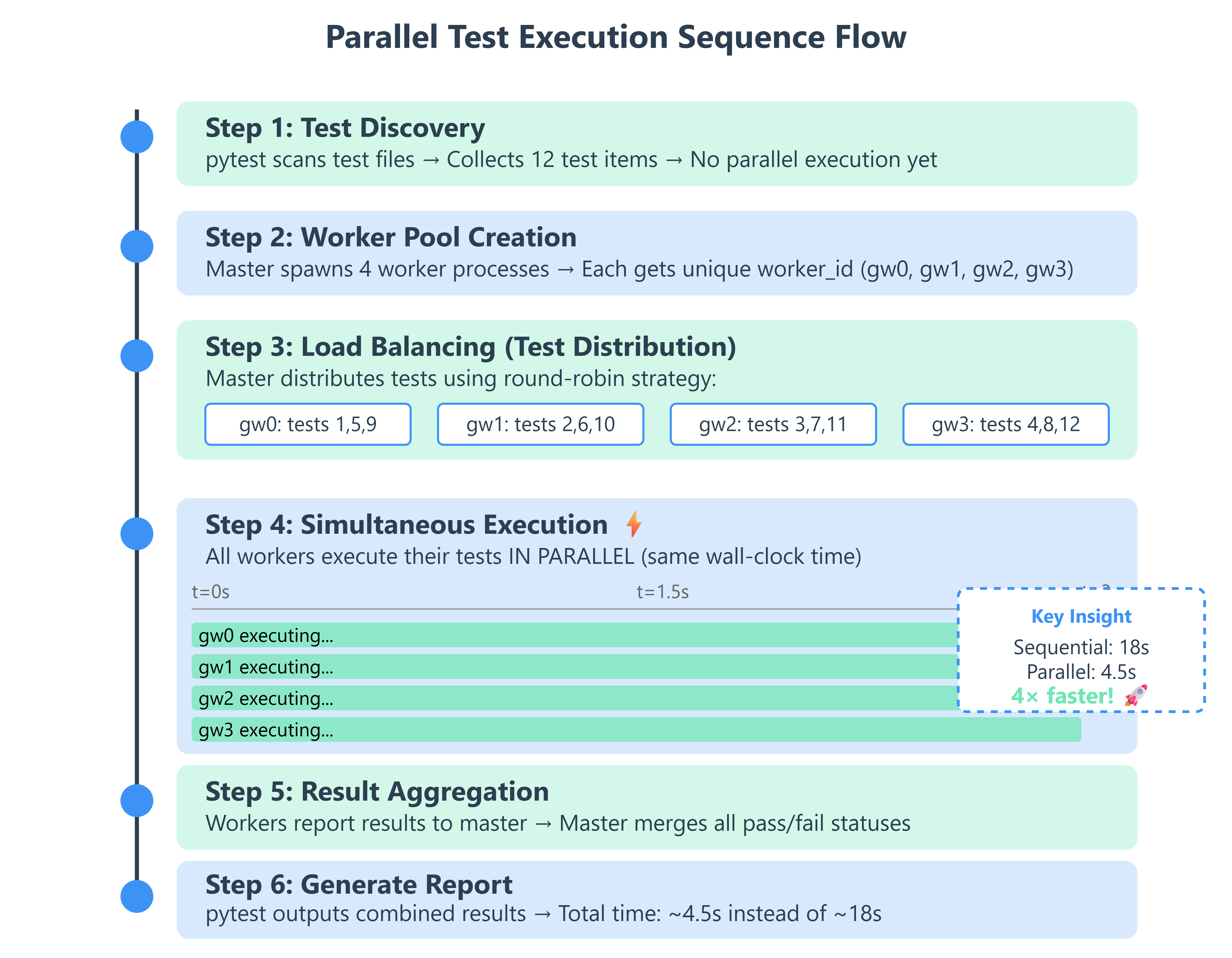
When you run pytest -n 4, here’s what happens under the hood:
Test Collection (Master Process):
pytest discovers all test files and test functions
Builds a list of test “items” to execute
This happens ONCE, not per worker
Worker Spawning (Master Process):
Master creates 4 child Python processes
Each worker gets a unique ID:
gw0,gw1,gw2,gw3Workers inherit the test environment but run in isolation
Test Distribution (Load Balancing):
Master uses a scheduling algorithm (default: load-balanced)
Sends test items to workers as they become available
Fast tests finish early, worker gets the next item
No worker sits idle while others are busy
Execution (Worker Processes):
Each worker runs its assigned tests
Has its own pytest session, fixtures, and setup/teardown
Reports results back to master via IPC (inter-process communication)
Result Aggregation (Master Process):
Collects pass/fail/error from all workers
Merges into a single test report
Handles any worker crashes gracefully
Critical Implementation Details
1. Worker Isolation
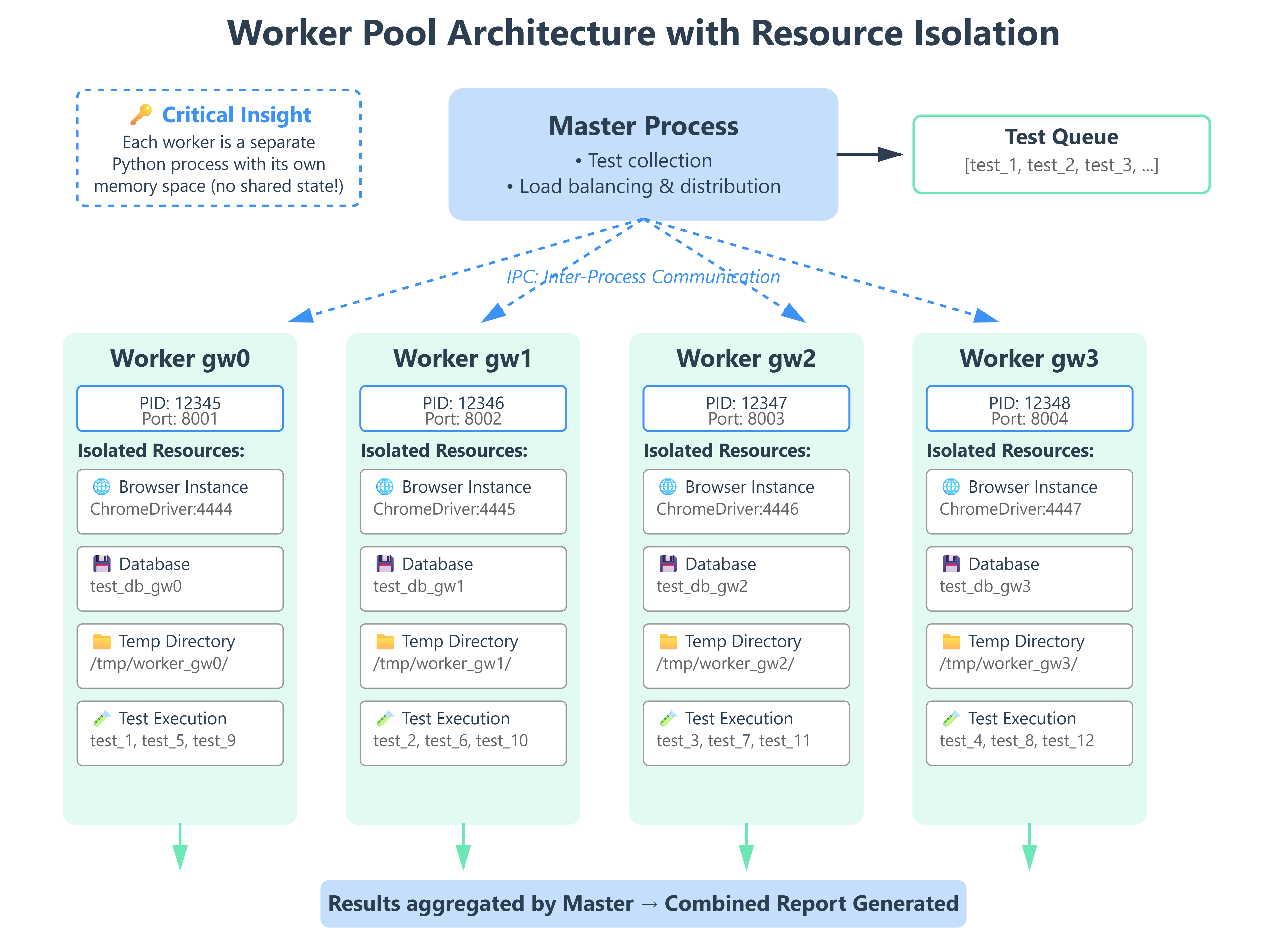
Each worker is a separate Python process. This means:
# This GLOBAL variable is NOT shared between workers
test_counter = 0

def test_increment():
    global test_counter
    test_counter += 1
    assert test_counter == 1  # ✅ Always passes (each worker has its own copy)
Why this matters: Your tests can’t rely on shared state. Each worker has its own memory space.
2. Fixture Scoping with Workers
import pytest

@pytest.fixture(scope="session")
def browser(worker_id):
    """Each worker gets its own browser instance."""
    if worker_id == "master":
        # Running without xdist
        port = 4444
    else:
        # worker_id is "gw0", "gw1", etc.
        worker_num = int(worker_id.replace("gw", ""))
        port = 4444 + worker_num

    driver = webdriver.Chrome()
    yield driver
    driver.quit()
The worker_id fixture is automatically provided by pytest-xdist. Use it to create unique resources per worker.
3. Database Isolation
@pytest.fixture(scope="session")
def database(worker_id):
    """Each worker gets its own database schema."""
    db_name = f"test_db_{worker_id}"
    create_database(db_name)
    yield db_name
    drop_database(db_name)
Why this works: Workers don’t step on each other’s data. gw0 writes to test_db_gw0, gw1 to test_db_gw1.
The pytest-xdist API
Basic Usage:
# Run tests on 4 CPU cores
pytest -n 4

# Auto-detect available cores
pytest -n auto

# Run each test multiple times across workers (stress testing)
pytest -n 4 --count=10

# Distribute tests across multiple machines
pytest --tx ssh=user@host1 --tx ssh=user@host2
Load Distribution Strategies:
# pytest.ini
[pytest]
# Default: load-balanced (send tests to free workers)
addopts = -n auto --dist loadscope

# loadscope: Tests in same class/module run on same worker
# loadfile: All tests in a file run on same worker
# loadgroup: Tests with same @pytest.mark.xdist_group run together
Why loadscope matters: If test_setup() is expensive (e.g., seeding a database), you want all tests in that class on the same worker to reuse the setup.
Production Readiness: Metrics That Matter
Here’s how you know your parallel execution is production-grade:
1. Speedup Ratio
Speedup = Sequential Time / Parallel Time

Target: Speedup ≥ (N cores × 0.75)
If you have 4 cores, you should see at least a 3× speedup. Less than that? You have serialization bottlenecks.
2. Worker Utilization
# Check if workers are balanced
pytest -n 4 -v  # Look at test distribution in output
If gw0 ran 50 tests and gw3 ran 10, your load balancing is broken. Tests might have inter-dependencies.
3. Test Stability
Flakiness Rate = (Failed on Retry / Total Tests) × 100

Target: < 0.1%
Parallel execution exposes race conditions. If tests pass sequentially but fail in parallel, you have shared state issues.
Step-by-Step Guide
Prerequisites
# Install pytest-xdist
pip install pytest-xdist --break-system-packages

# Verify installation
pytest --version  # Should show pytest-xdist in plugins list
Execution
Step 1: Create 4 Independent Tests
# tests/test_parallel_demo.py
import time
import pytest

def test_api_endpoint_1():
    time.sleep(2)  # Simulate API call
    assert True

def test_api_endpoint_2():
    time.sleep(2)
    assert True

def test_api_endpoint_3():
    time.sleep(2)
    assert True

def test_api_endpoint_4():
    time.sleep(2)
    assert True
Step 2: Run Sequentially (Baseline)
time pytest tests/test_parallel_demo.py
# Expected: ~8 seconds (4 tests × 2 seconds each)
Step 3: Run in Parallel
time pytest tests/test_parallel_demo.py -n 4
# Expected: ~2 seconds (all tests run simultaneously)
Step 4: Compare Results
# With detailed output
pytest tests/test_parallel_demo.py -n 4 -v

# See which worker ran which test
# [gw0] PASSED tests/test_parallel_demo.py::test_api_endpoint_1
# [gw1] PASSED tests/test_parallel_demo.py::test_api_endpoint_2
# [gw2] PASSED tests/test_parallel_demo.py::test_api_endpoint_3
# [gw3] PASSED tests/test_parallel_demo.py::test_api_endpoint_4
Verification
1. Check Speedup:
# verify_parallel_speedup.py
import subprocess
import time

def measure_execution_time(parallel=False):
    cmd = ["pytest", "tests/", "-q"]
    if parallel:
        cmd.extend(["-n", "4"])

    start = time.time()
    subprocess.run(cmd, capture_output=True)
    return time.time() - start

sequential_time = measure_execution_time(parallel=False)
parallel_time = measure_execution_time(parallel=True)
speedup = sequential_time / parallel_time

print(f"Sequential: {sequential_time:.2f}s")
print(f"Parallel (4 cores): {parallel_time:.2f}s")
print(f"Speedup: {speedup:.2f}×")
assert speedup >= 3.0, "Speedup too low—check for bottlenecks"
2. Check Worker Distribution:
pytest tests/ -n 4 -v | grep -E "gw[0-3]" | sort | uniq -c
# Should show roughly equal test counts per worker
3. Test for Race Conditions:
# Run tests 100 times to expose flakiness
pytest tests/ -n 4 --count=100
# All tests should pass consistently
Working Demo Link :
Common Pitfalls and Solutions
Pitfall 1: Shared Resources
Problem: Tests write to the same file/database/port. Solution: Use worker_id fixture to create unique resources.
Pitfall 2: Test Order Dependencies
Problem: test_b() assumes test_a() ran first. Solution: Make tests independent. Use fixtures for setup.
Pitfall 3: Suboptimal Load Balancing
Problem: One test takes 50 seconds, others take 2 seconds. Worker runs the slow test while others sit idle. Solution: Break slow tests into smaller units, or use --dist loadscope.
Final Thoughts
Parallel execution isn’t a “nice to have”—it’s a requirement for production-grade test infrastructure. The difference between a 5-minute and a 20-minute test suite is the difference between rapid iteration and deployment paralysis.
Remember: Your CI/CD pipeline is only as fast as your slowest test suite. Make parallelism the default, not the exception.